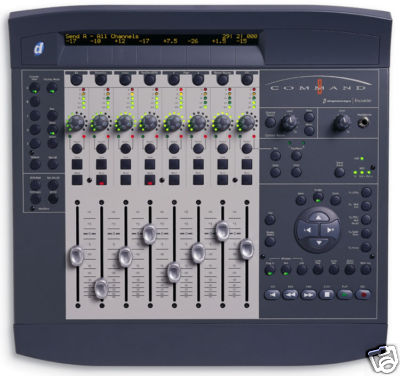
DIGIDESIGN COMMAND 8 PROTOOLS CONTROL UNIT USED
€
426
$
482


Favourite Auctions
To save auctions to your favourites, please login
If you don't have an account, please register
Description
Command|8 puts integrated, tactile manipulation of Pro Tools TDM or LE systems running on Windows XP or Mac OS X at your fingertips more affordably than ever before. While there are several compact control surface options from third-party manufacturers compatible with Pro Tools, only Command|8 was made by Digidesign and Focusrite specifically for Pro Tools. As a result, Command|8 provides a great deal more sophisticated control with Pro Tools software, and has been tested and qualified specifically for Pro Tools. Borrowing elements from Digidesign’s higher-end control surfaces, Command|8’s eight bankable channels of moving faders, rotary encoders, and displays enable you to control Pro Tools with the hands-on feel of a traditional analog console. What’s more, its onboard monitor system features Focusrite audio performance and quality, accommodating Pro Tools audio along with external inputs, speakers, and separately controlled headphone outs. A simple USB connection facilitates communication between Command|8 and your computer. Command|8 also includes an integrated, fully editable MIDI interface and features a stand-alone MIDI controller mode, enabling you to use it with your favorite third-party MIDI applications and devices — any that accept MIDI control change messages for level, panning, solo, mute, MIDI Machine Control, and other mappable parameters. For post production suites, Avid products are natively supported by Command|8, including Avid Media Composer. When used with Avid products, Command|8 can be used to control the Automation Gain Tool for recording dynamic volume automation as well as Solo, Mute and Snap Mode on and off. Better yet, Command|8’s onboard monitor section alleviates the need for an external mixer for speaker control. Command|8 Features Inexpensive, full-featured control surface specifically designed for Pro Tools Supports both Pro Tools TDM and LE systems (independently) Simple USB connection to your PC or Mac Compact size; comfortable ergonomic layout 8 touch sensitive motorized faders, 8 automatable rotary encoders with LED rings Big, bright, 110-character (55 characters x 2 rows) backlit LCD display for easily viewing information Integrated 1-IN/2-OUT MIDI interface (16 channel in, 32 out) Standalone MIDI controller mode Flexible Focusrite onboard monitoring section Works natively with the Avid family of products’ Automation Gain Tool May be used in conjunction with ProControl, Control|24, and Digi 002 110-character LCD Display Displays track names, track & plug-in parameter values, timecode, etc. Channel View Controls Plug-in or Pan/Send controls for a selected INSERT or SEND Buttons: EQ, DYNAMICS, INSERT, PAN/SEND/PRE, PAGE, Master Bypass, ESC Console View Controls Controls status display of pans, sends, or inserts across all channels simultaneously Defaults to channel pan position; select A-E to determine which SEND or INSERT values are displayed in the scribble strip Modifier Keys Correspond to their computer keyboard counterparts Fader Section 100 mm touch-sensitive moving faders with support for +12 dB fader scale SELECT, SOLO and MUTE buttons and color-coded LED indicators Multi-purpose rotary encoders with 11-LED rings displaying pan position, send level, etc. Five-segment LED meters (0 to –42 dBFS) Control Room and Headphone Controls Control Room: Mute, Mono, and External Source monitor selectors; dedicated volume level control Headphones: 1/4" stereo headphone jack; dedicated volume level control Miscellaneous Controls and Indicators Record-enable, Pan/Meter (with L/R indicators), Enter, and Undo selectors Standalone button — Places Command|8 into stand-alone controller mode USB and MIDI activity indicators Master Fader/Flip Controls Master Fader: Activate to move master fader control to the rightmost faders Flip: Activate to move PAN/SEND or INSERT control from rotary encoders to faders Navigation Keys Four-key navigation pad enables you to BANK through software mixer eight faders at a time, NUDGE through mixer one channel at a time, or ZOOM in or out on track data horizontally or vertically, and move the play selector horizontally and vertically Specialized Function Controls Including Utility,Midi Edit (for MIDI mapping), PRE/Midi recall (recalls MIDI controller sets, MIDI maps, or Digidesign PRE parameter values), Fader Mute, and plug-in Focus General Controls Select Pro Tools interface window (Plug-in, Mix, or Edit), Loop Play, Loop Record, Quick Punch, and Memory Location Transport Controls Control common transport functions within Pro Tools (Play, Record, Stop, etc.) Interfaces 1-IN/2-OUT MIDI interface USB connector 1/4" Punch In connector Outputs Speaker outputs — 1/4" TRS (balanced/unbalanced) connectors with +4 / –10 push button Monitor Inputs Main and External Source stereo inputs — 1/4" TRS (balanced/unbalanced) connectors with +4 / –10 push button per pair Power Power cable connector Power switch Control Surfaces C|24 Command|8 Quick Links Events/Demos Training and Education We sell it because we updated our control surfaces to bigger models ;o) but this is 100% working & rocking! Happy bidding
price rating